


Staring at a blank screen and wondering what you’re going to write about this week’s post is frustrating. I’ve been there, done that. That is why learning how to create a content calendar can make blogging easier, especially when you are diving into content creation after 50 and want to stay consistent without burning yourself out.
The problem is not always a lack of ideas. Sometimes the ideas are there, but they are scattered. Other times, you feel bored, stuck, or unsure which topic makes the most sense to write next.
That is where a simple content calendar helps.
A content calendar gives your blog a basic plan. It helps you decide what to publish, when to publish it, and how each post fits into the bigger picture. If you are just getting started, or you are trying to get back into a steady rhythm, having a plan can keep blogging from feeling like a weekly scramble.
If you are still in the early stages of building your site, my post Starting a Blog After 50: How to Share Your Experience Online is a good place to start. Once your blog is set up, a content calendar can help you keep it moving.
Step 1: Choose a Realistic Blogging Schedule
The first step is deciding how often you can consistently publish new content.
Not how often you wish you could publish.
Not how often another blogger says you should publish.
The key is to decide how often can you realistically write, edit, create, and publish your new posts.
That is the question that matters.
A blog post is more than writing a draft. You may also need to create or choose images, add internal links, write a SEO title, create a meta description, check formatting, and make sure the post is helpful for the reader.
Then, after it is published, you still need to promote it.
That could mean Pinterest pins, social posts, email, or other content tied to the post.
This is why a manageable schedule is better than an ambitious one.
If you are just starting out, posting once a week or once every two weeks is a good, manageable goal. The key is being consistent. Publishing one good post every week is better than planning three posts a week and burning out after a month.
You also want the posts to be worth reading. A calendar helps with consistency, but the content still needs to serve your reader. My post How to Create Engaging Content That Readers Actually Want to Read goes deeper into that part.
Step 2: Choose Your Main Content Categories
The next step is choosing the main topics your blog regularly covers.
These are the categories that keep your blog focused. They also make planning easier because you are not trying to write about everything.
For example, my main topics are:
- Building the Dream
- Content Creation Over 50
- Blog Strategy and Growth
- SEO and Visibility
Those categories give me a structure to work from. When I sit down to plan content, I can look at those topics and decide which area needs attention.
Your categories will be different, and that is fine. The important thing is to choose three to five topics that support the purpose of your blog.
Too many categories can make your site feel scattered. Too few can make your content feel repetitive.
A good content calendar helps you rotate between your main topics. Instead of writing four SEO posts in a row, you might write one post about SEO, one about content planning, one about blog growth, and one personal update.
That keeps your blog from feeling stale.
It also helps you build a stronger site over time because your posts start working together. This is one reason evergreen content matters. A post that stays useful can keep helping readers long after it is published. I explain more about that in What Is Evergreen Content and Why It Matters for Content Creation Over 50.
Step 3: How to Build a Continuous Blog Post Idea List
Before you start assigning dates, create a blog post idea list.
This step matters because planning dates without enough ideas can make the calendar feel forced. It is better to collect ideas first, then decide where they fit.
Your ideas can come from several places:
- Reader questions
- Keyword research
- Old blog posts
- Personal experience
- Problems you have solved
- Topics you keep explaining
- Mistakes you have learned from
The best ideas usually come from specific reader problems.
A broad topic like “blogging” is too general. But “how to create a content calendar” is specific. It tells the reader exactly what the post will help them do.
That is what you want.
Take a broad subject and narrow it down into a real problem your reader has.
For example, “blog planning” could become:
- How to Create a Content Calendar
- How to Find Blog Post Ideas
- How to Plan One Month of Blog Content
- How to Stay Consistent With Blogging
Each one is more useful than a vague topic.
I used to keep my ideas in a notebook and write everything down by hand. That worked for a while. Today, I use OneNote because I can access it from my phone, laptop, or iPad.
That way, when inspiration hits, I have a place to jot it down.
And inspiration does not always show up when you are sitting at your desk. Sometimes it shows up while you are reading, walking, working on images, or thinking about a completely different project.
For me, featured images often drive my creativity. The visual idea can lead to the writing idea, and the writing idea can lead to another post. I talked about that in The Thinker, the Puggle, and the Evolution of My Featured Images.
Step 4: Plan One Month of Content
Once you have a list of ideas, plan one month of content.
Do not start by planning the next six months.
That might sound productive, but it can become overwhelming. Your blog may shift. Your schedule may change. A better idea may come along.
One month gives you enough structure without locking you into a plan that no longer fits.
If you publish once a week, choose four ideas.
Then assign each one a publishing date.
For each post, include:
- Working title
- Primary keyword
- Content category
- Internal links
- Post status
That is enough to keep things organized.
Here is a simple example:
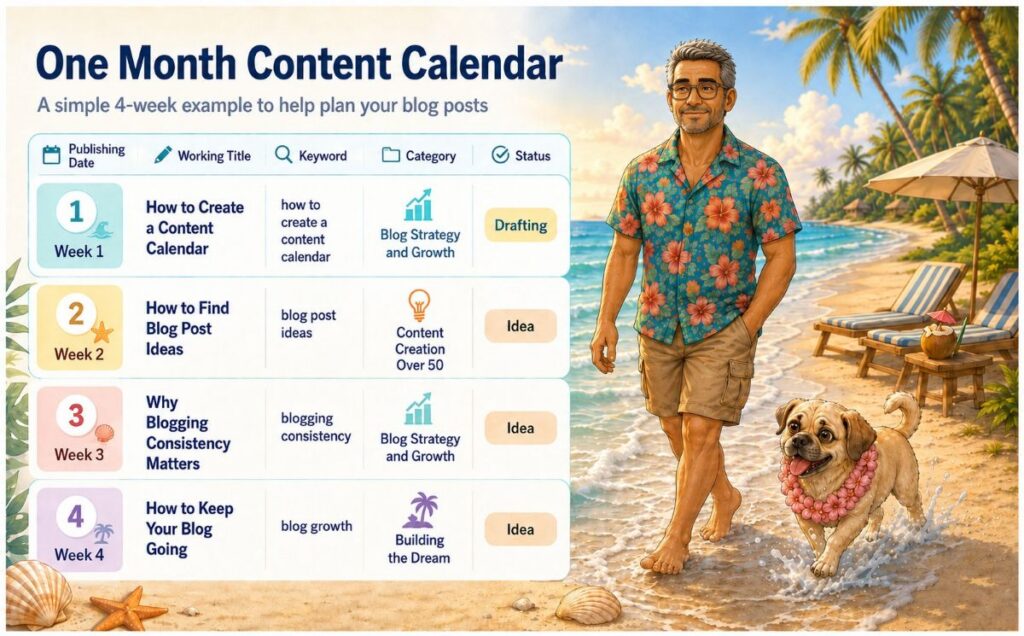
This does not need to be fancy.
The calendar only needs to show what is coming next and what still needs to be done.
Also, leave room to move or replace posts. A content calendar should guide you, not trap you. If a topic no longer feels right, move it. If a stronger idea comes up, use it.
A good blog post still needs to be useful, focused, and clear. My post 10 Qualities of a Great Blog Post That Drives Results can help you check the quality of the post before you publish it.
Bonus Step 5: Create a Series for Your Blog Posts
Even though this post is built around four steps, there is one bonus step worth adding.
Create a series.
A blog post series is a group of related posts that work together. It could include three to six topics built around one main idea.
This post is part of my “Keeping Your Blog Alive” series.
A series helps because you are not creating random posts one at a time. You are building a group of posts that connect. That makes planning easier and gives you more internal linking opportunities.
It also allows you to create multiple posts in one sitting, or more realistically, over the course of a week or two. Once those posts are drafted and scheduled, you free up time for other tasks.
For me, that might include Pinterest pins, Dan & Sami projects, or my Tuesday Building the Dream series.
A series also helps readers because each post answers a related question.
For example, a “Keeping Your Blog Alive” series could include:
- Why blogs fail
- How to create a content calendar
- How to find blog post ideas
- How to stay consistent
- How to avoid burnout
Each post can stand alone, but together they create a stronger resource.
What to Include in Your Content Calendar
A content calendar does not need to be complicated.
Start with the basics:
- Publishing date
- Working title
- Primary keyword
- Content category
- Post status
- Internal links
That is enough for most bloggers.
For post status, keep it simple. Use labels like idea, drafting, editing, scheduled, and published.
Internal links are also important. Before you publish, look for older posts that connect to the new one. This helps readers find more useful content and helps your blog feel more connected.
Common Content Calendar Mistakes
A content calendar should make blogging easier, but it can become another problem if you overdo it.
The first mistake is planning too many posts. If your schedule is too full, you will fall behind quickly. Start smaller than you think you need to.
The second mistake is making the calendar too complicated. You do not need a giant spreadsheet with twenty columns. You need a simple system you will actually use.
The third mistake is choosing repetitive topics. If every post sounds the same, you will get bored, and your readers may too. Rotate between your main categories.
The fourth mistake is refusing to adjust the schedule. Your calendar is a plan, not a contract. Move posts when needed. Replace weak ideas with better ones. Keep the system flexible.
Let’s Wrap This Up: How to Create a Content Calendar
A content calendar should make blogging easier.
It helps you stay organized, plan ahead, and avoid the pressure of coming up with ideas at the last minute.
Start small.
Choose a realistic posting schedule. Pick your main categories. Create a blog post idea list. Then plan one month of content.
You can improve the system later.
For now, keep it simple and flexible.
That is the kind of content calendar you are more likely to use.

About the Author: Dan Swords
Dan Swords is a writer, blogger, and content creator with more than 35 years of professional technical writing experience and over 13 years creating content for the web. Through danswords.com, he shares practical advice to help aspiring bloggers and creators get their ideas online. His focus is simple: helping people start and grow a blog with clear writing, engaging content, and practical strategies that actually work.