

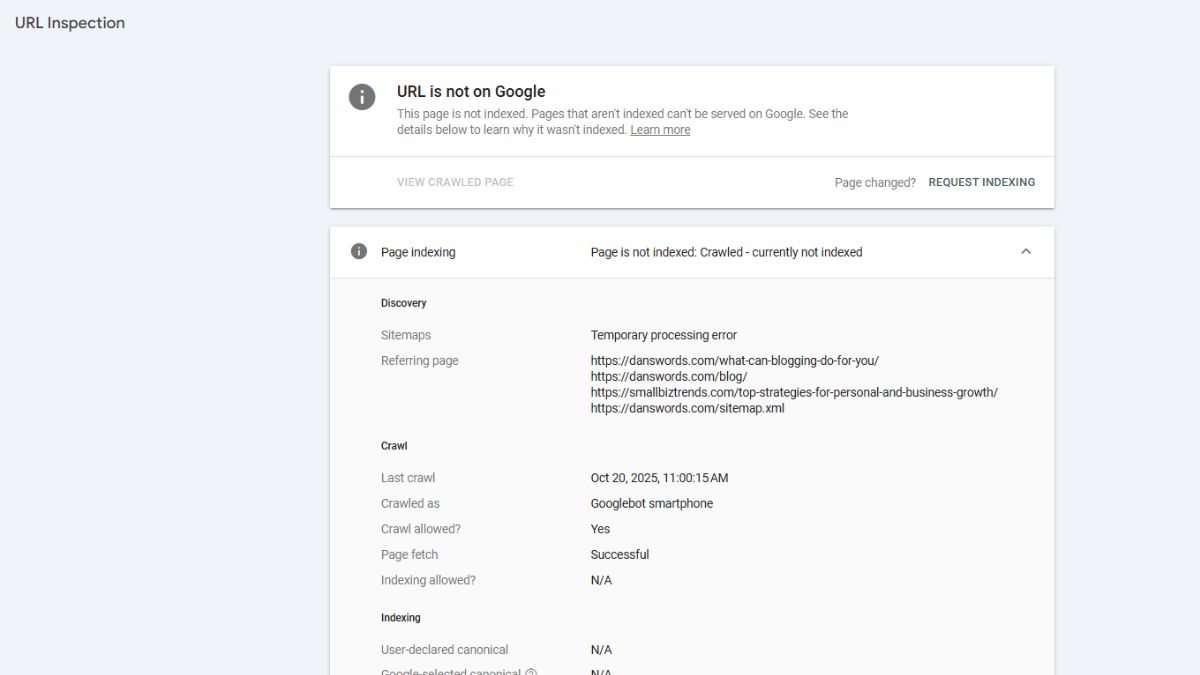
If your blog post is crawled but not indexed, Google found your page, looked at it, and decided not to include it in search results. The featured image in this post is from one of my posts.
It happens to us all. 😕
It’s frustrating. You did the work. You hit publish. And nothing happens.
I ran into this on my own website, and instead of guessing, I started fixing what actually mattered and focusing on creating content that people actually want to read.
Here’s how to figure out if it’s happening to you, and what to do about it.
How Do You Know If Your Page Is Crawled but Not Indexed
There are two easy ways to check.
Option 1: Google Search
Go to Google and type:
site:yourdomain.com
This shows pages that are indexed.
If your post doesn’t show up, there’s a good chance it’s not indexed yet.
Option 2: Google Search Console (Best Option)
This is where you’ll get the real answer.
Step 1: Open Google Search Console
Step 2: Go to “Pages” or “Indexing”
Step 3: Look for “Discovered – currently not indexed”
Step 4: Click into it and find your URL
Or you can enter the URL at the Inspect any URL search bar.
This will tell you:
- Google found your page
- Google crawled your page
- Google chose not to index it
That last part is the key.
This is not a technical issue. It’s a content decision.
Why Your Blog Post Isn’t Being Indexed
Most of the time, it comes down to one thing.
The content isn’t strong enough.
That doesn’t mean it’s bad. It just means it’s not strong enough compared to everything else already out there. This usually means something is missing in how your content is positioned, which is exactly what learning how to rank your blog on Google helps fix.
When I looked at some of my own posts, especially older ones, I saw it right away. The content was generic, outdated, or didn’t really say anything new.
Google saw the same thing.
Most of my early posts had the same problem. They weren’t terrible, but they didn’t stand out either.
They sounded like everything else online.
That’s when I realized something important. Google isn’t looking for “good enough” content. It’s looking for content that adds something new, even if it’s a small shift in perspective.
That’s when I stopped trying to write what I thought should rank, and started writing what I actually experienced.
Action Plan to Fix Crawled but Not Indexed
This is what actually moved things forward for me.
Step 1: Rewrite the post completely
Don’t tweak it. Rewrite it.
Stronger intro. Clear structure. Better flow.
Step 2: Focus on one clear topic
No bouncing around. One problem. One solution.
Step 3: Add real experience
Not just advice. What you’ve actually done. This is the Experience part of E-E-A-T.
Step 4: Improve internal linking
Link to the post from other relevant pages on your site.
It Happens to All of Us
I ran into this when I restarted my blog.
I had old posts saved as Word documents on my hard drive. Some of them were over 10 years old. I added them back to my site thinking I had a head start.
Google crawled them right away.
But they didn’t get indexed.
The content just wasn’t strong enough anymore. Times changed. Expectations changed. What worked back then doesn’t work now.
So I sat down and rewrote them.
Not small edits. Full rewrites.
And that’s when things started to shift.
What I Focused On to Avoid Crawled but Not Indexed
Step 1: Make the content better, not longer
More clarity. Less filler.
Step 2: Write like I actually talk
No generic blog voice.
Step 3: Solve one real problem
Not ten weak ones.
Should You Fix It or Leave It Alone?
This is something most SEO guides don’t explain clearly.
Not every crawled but not indexed page needs to be rewritten right away.
Here’s how I look at it.
If the post has zero impressions after a couple of weeks:
It’s a content problem. Go fix it.
If impressions are starting to show up:
Leave it alone for now. Google may still be testing it.
If the post is older and still not indexed:
It’s time for a rewrite. You could remove it but then there’s the broken link issue with the removal. I’d select rewrite over removal just about any day of the week.
This is where I started paying closer attention to how my content was performing overall. When I began focusing on writing stronger posts from the start, the indexing issues became less frequent, especially as I applied the same principles that make a blog post actually hold attention and deliver value.
What to Do Next
If your page is crawled but not indexed, don’t panic.
But don’t ignore it either.
Go back and look at the post honestly. Does it answer a question or resolve a problem. Is there detail in it or fluff?
Is it something you’d actually read?
Is it better than what’s already ranking?
If not, fix it.
That’s what worked for me. And it’s what continues to work as I build this site out.
Quick Checklist Before You Resubmit a Post
✅ Does the post clearly solve one specific problem?
✅ Is the intro strong enough to pull someone in?
✅ Is the content better or different than what’s already ranking?
✅ Have you added internal links from other posts?
✅ Does it sound like you, or does it sound generic?
❓ If you hesitate on any of these, fix that first.
Let’s Wrap This Up: Crawled but Not Indexed
Crawled but not indexed isn’t a technical failure.
It’s feedback.
Once I stopped looking for quick fixes and started improving the actual content, things began to move.
Slowly at first. Then more consistently.
That’s how this works.
Common Questions About Crawled but Not Indexed
How long does it take for a page to get indexed?
It can take a few days to a few weeks. If nothing happens after that, it’s usually a sign the content needs improvement.
Does resubmitting the URL help?
It can help Google recheck the page, but it won’t fix weak content. If the page hasn’t changed, the result usually won’t either.
Should I delete posts that aren’t indexed?
Try improving them first. If they still don’t get indexed after updates, then consider removing or redirecting them. The problem with deleting is that there may be links to this content. You don’t want to delete a post and generate a 404 Error.
Is this a technical SEO issue?
Most of the time, no. If your site is being crawled, the issue is usually content quality, not technical setup.

About the Author: Dan Swords
Dan Swords is a writer, blogger, and content creator with more than 35 years of professional technical writing experience and over 13 years creating content for the web. Through danswords.com, he shares practical advice to help aspiring bloggers and creators get their ideas online. His focus is simple: helping people start and grow a blog with clear writing, engaging content, and practical strategies that actually work.